
For gig & delivery drivers
Every mile and shift, tracked on your phone — never a server.
Mile-Shift auto-logs your drives, times your shifts, and shows how much to set aside for taxes — with IRS-ready reports in two taps. 30 days free, then $1.99/month. No account. No card. No data mining.
Android coming soon
30-day free trial on your device — no card, no account, no strings.
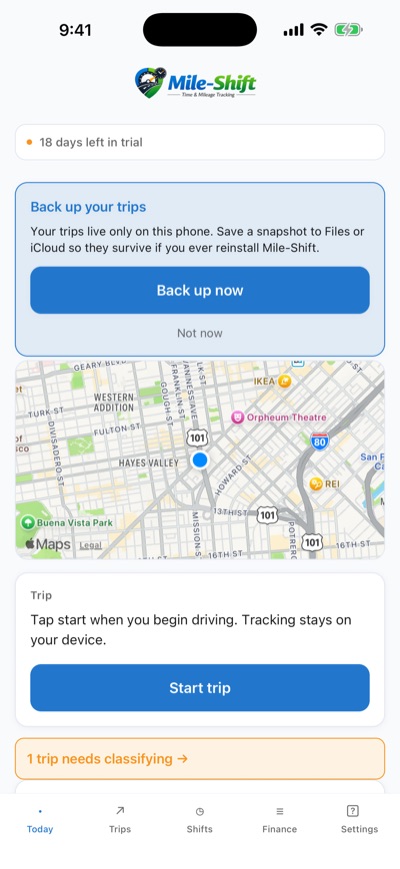
Your trips stay on your phone
No account needed
IRS-ready logs
It tracks the drive. You just swipe.
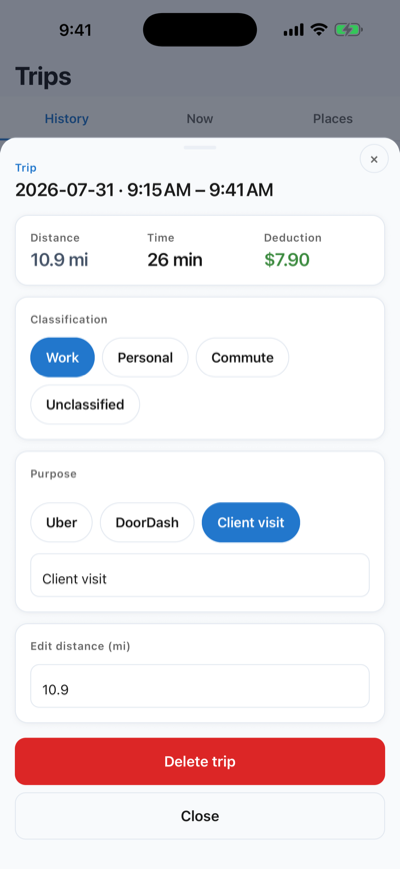
Mile-Shift can detect when you start driving and log the trip automatically — entirely on-device. When you're done for the day, classify trips with a swipe: work or personal, two seconds each.
- ✓ Optional auto-detect — or one tap to start and stop
- ✓ Swipe to classify work, personal, or commute
- ✓ See the tax deduction value of every single trip
- ✓ Saved places and purposes — tag Uber, DoorDash, client visits in two taps
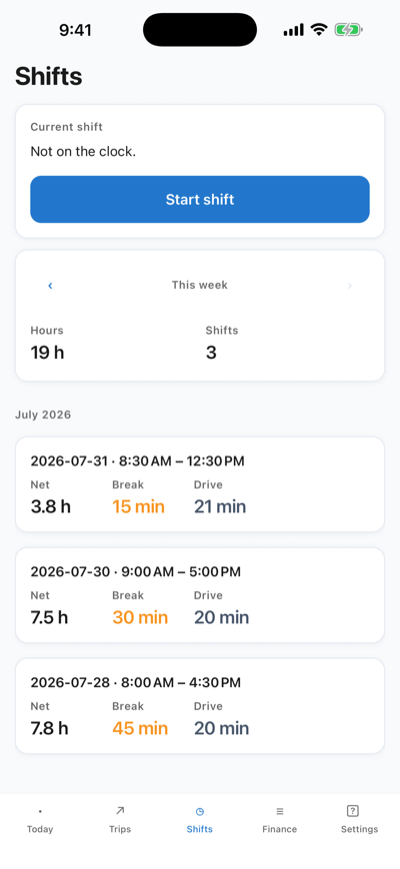
Clock in. Mile-Shift keeps the score.
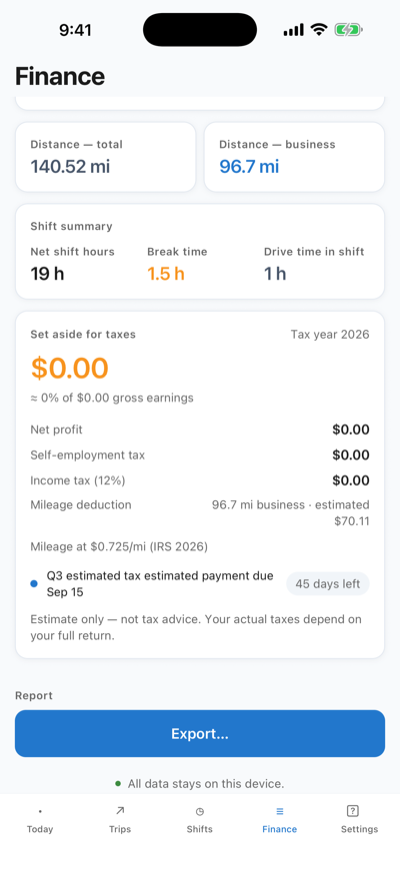
The one thing no mileage app has: real shift tracking. Time every block of work, subtract breaks, and see net hours next to the miles you drove — the numbers that tell you what a gig actually pays.
- ✓ One-tap clock in / out with break tracking
- ✓ Net hours, break time, and drive time per shift, week, or month
- ✓ Jobs with step checklists, repeat schedules, and reminders
- ✓ Earnings and jobs attached to every shift — see what a day really paid
Know what to set aside for taxes — before the bill arrives.
Log what each platform paid you, and Mile-Shift turns miles and earnings into an always-current tax estimate — with your mileage deduction already counted and a countdown to your next estimated-payment deadline.
- ✓ Earnings tracking — your real $ per hour and $ per mile
- ✓ Built-in 2026 tax rules for the US, Canada, UK, Germany, France, Spain, Australia, Mexico, and Brazil — plus a custom rate for anywhere else
- ✓ Mileage deduction at the rate in force on the day you drove — the IRS rate rose to 76¢ on July 1, 2026 (see the 2026 rates)
- ✓ CSV and PDF export with the columns the IRS expects
Estimate only — not tax advice.
Local-first, explained plainly
Your location history is nobody's business.
Most mileage apps upload every trip you take to their servers. Mile-Shift can't — there's no Mile-Shift server for your trips to go to.
A database on your phone
Trips, shifts, and earnings live in a SQLite database on your device. Delete the app and the data is gone — because there is no copy anywhere else.
Backups you control
Optional snapshots go to your iCloud Drive or Files — storage under your Apple ID, not ours. Restore them when you switch phones.
No cloud, no account
The trial starts on your device — no sign-up, no email, no card. We couldn't read your driving history if we wanted to.
No data mining
No advertising IDs, no third-party analytics SDKs, no selling "anonymized" location data. Compare our App Store privacy label with MileIQ's or Everlance's.
The full story, in plain English: our privacy policy.
Try everything free for 30 days.
The trial runs on your device — no card, no account. If it's not for you, delete the app and you were never charged.
Monthly
$1.99/mo
Yearly
$19.99/yr
- ✓ Everything included — no tiers, no add-ons
- ✓ Unlimited trips, shifts, jobs, and earnings
- ✓ IRS-ready CSV + PDF exports
- ✓ Billed by Apple — cancel anytime in your App Store settings
For scale: the big mileage apps charge $5.99–$8.25/month. Mile-Shift is $1.99 — and keeps your data on your phone.
Questions drivers actually ask
Will it drain my battery?
No. Auto-detect uses your phone's motion and significant-location APIs — the same low-power tricks the built-in apps use — and sleeps when you're not driving. If you prefer, turn auto-detect off and start trips with one tap; then GPS only runs while a trip is recording.
Does it work offline?
Yes. GPS doesn't need a data connection, and every trip and shift is saved straight to the database on your phone. You can drive through a dead zone — or leave your data plan off entirely — and nothing is lost.
How do I export my mileage for taxes?
Pick a date range and tap Export. Mile-Shift builds a CSV or PDF with the columns the IRS expects — date, business purpose, start and end, distance, deduction value — and hands it to your share sheet so you can email it to yourself or your accountant.
What happens after the 30-day trial?
The app tells you when the trial is ending — there's no card on file, so nothing is charged automatically at the end of it. To keep tracking, subscribe for $1.99/month or $19.99/year through Apple. Your existing trips and shifts stay on your device either way.
Is my data really private?
Really. Your trips are stored in a database on your phone, and there is no Mile-Shift server holding a copy. No account is required to try it, and there are no ad or analytics SDKs. The app only reaches out for three things: your subscription, a place you search for (sent to OpenStreetMap's geocoder), and nothing else. Check our App Store privacy label — then check any other mileage app's.
When is Android coming?
It's in the works. Mile-Shift launched on iPhone first; the Android version is planned next. Email support@mile-shift.com and we'll let you know the moment it ships.
Your miles. Your shifts. Your phone.
30 days free, then $1.99/month. No account, no card, no data mining.
Android coming soon